Introduction
Platform Architecture
secureFlows is a private per-user data layer: your application stores encrypted session payload behind hosted login, while the platform enforces tenant isolation, workspace-level encryption, lifecycle policy, and operator visibility. You integrate at the client edge; everything in the diagram below is owned and connected for you.
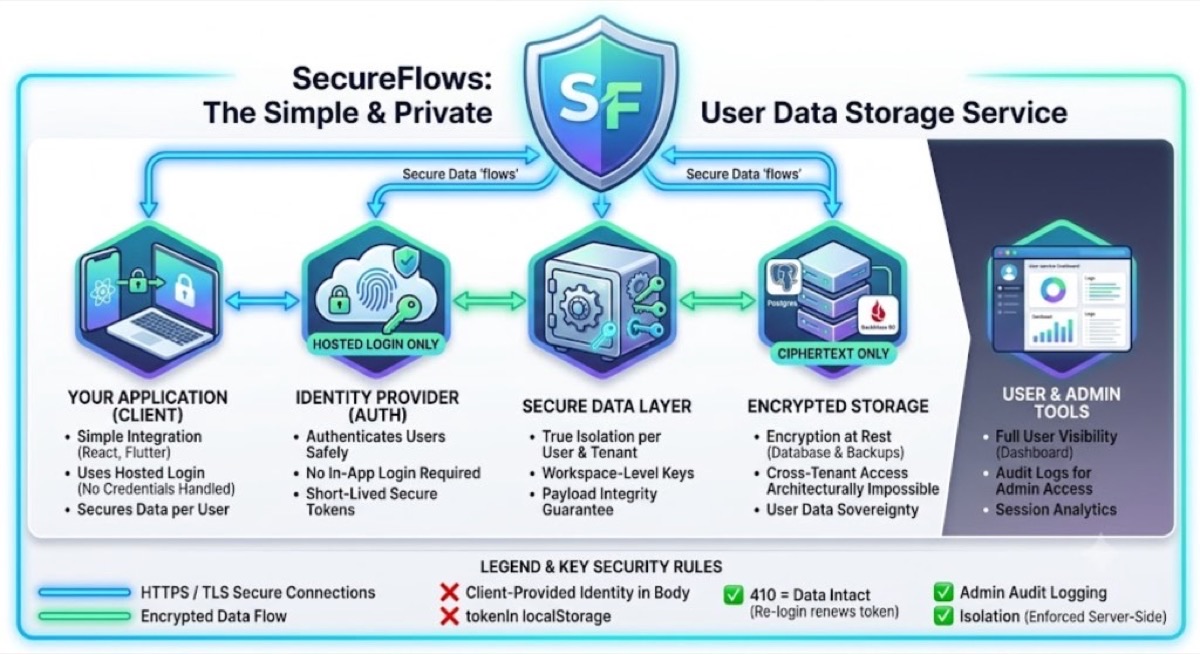
The five layers
Read left to right. Each column is a concern you would otherwise stitch together yourself — auth SaaS, a database, row-level security, backup encryption, audit pipelines. secureFlows ships them as one system with boundaries enforced on the server, not in your client code.
-
1. Your application (client)
React, Flutter, plain JavaScript, n8n, or any HTTP client. Register an application in Workspace Manager, redirect users to hosted login, and receive a
sessionTokenon return. Your code never handles passwords, never stores credentials, and never sends “who is this user?” in a request body — identity is derived from the verified token on every API call.From there you create and update session payload (profiles, form state, preferences, anything that belongs to one user). Multiple applications can live in the same workspace; each session is scoped to the
appIdthat created it. -
2. Identity provider (auth)
Hosted login only. Users sign in through secureFlows’ hosted UI — your app does not embed login forms or touch identity provider configuration. After authentication, your integration works exclusively with short-lived
sessionTokenvalues sent on API requests.Token expiry bounds the blast radius of a leaked credential. The underlying session and its encrypted payload survive token expiry; re-login issues a fresh token for the same session. Renewal is a credential operation — it does not extend data lifetime or rewrite TTL policy.
-
3. Secure data layer
This is where secureFlows enforces what integrators cannot safely replicate in app code: every session is bound to exactly one user, one workspace (tenant), and one application. Cross-user and cross-tenant reads are architecturally blocked — not merely forbidden by policy you might misconfigure later.
Payload is encrypted with workspace-level keys before persistence. Per-application settings — token lifetime, payload TTL, redirect URI allowlists — are applied here. Open redirects are structurally impossible: users return only to URIs you registered for that app.
-
4. Encrypted storage
Postgres holds session metadata and ciphertext. Backups (for example Backblaze B2) inherit the same guarantee: ciphertext only at rest on database, backup, and raw disk paths. If someone obtained cross-tenant storage access, they would still see nothing readable without the workspace keys secureFlows manages.
Workspace admins and owners can read decrypted payload through the API when their role allows it — every such read is audit-logged. That is an explicit operator capability, not a leak in the storage model.
-
5. User & admin tools
End users get a self-service dashboard at /app/self when the workspace has
enableSelfServiceenabled: list their sessions, inspect their own data, revoke anything that looks wrong — no extra code in your product. Workspace operators use Workspace Manager for applications, invites, session tables, analytics, and security audit.Analytics and audit views show activity metadata — counts, actors, session ids, per-app breakdowns — never decrypted payload. Operational questions (“how many live sessions this week?”) and compliance questions (“who accessed this session?”) are answered without building log infrastructure.
How data moves
The diagram uses two line colors — both describe protection, at different stages of the path:
The shield at the top is the platform contract: your application speaks to one API and one login flow. Identity routing, encryption, isolation, TTL enforcement, and audit emission happen behind that boundary — so a new product line does not mean a new security stack.
Security rules baked in
The legend under the diagram is the integration contract. These are not style suggestions — they mirror how the backend actually authorizes requests:
sessionToken. Letting the client assert identity would bypass the entire isolation
model.
localStorage. Browser storage is the wrong trust boundary for
session credentials. Follow the hosted-login return flow and in-memory token handling in our integration
guides — do not invent parallel session state.
sessionToken for the same session.
What this buys you
Ship a web app, a mobile companion, or an automation hook. You are not also shipping login UI, key management, backup encryption, session revocation UX, or audit pipelines. Register another application in the same workspace and the same guarantees apply — scoped sessions, allowlisted redirects, per-app TTL, per-app audit — without cloning infrastructure.
That is the architectural bet: one private data layer for per-user state, with security properties that stay true as your product surface grows.
Where to go next
Compare secureFlows to vaults, auth SaaS, and KV stores in Differentiation. Read why integrated security matters for fast-moving development in Security Infrastructure. When you are ready to wire code, start with Build your First Application.