Architecture reference
System Components
secureFlows is a hosted per-user data layer: your application talks to a Session API over HTTPS while the platform handles identity, envelope encryption, tenant isolation, lifecycle policy, and audit. Nothing sensitive is trusted from the client — workspace context and roles are derived server-side from short-lived tokens.
Technical introduction
From an engineering perspective, secureFlows is not a library you embed for security. It is a managed boundary
between your app and user-owned payload: clients hold a sessionToken in memory, call ai-safe session
endpoints, and never send userId or workspaceId in request bodies. The Management API
(workspaces, applications, invites, users, audit) is separate, JWT-gated, and intended for operators — not
end-user runtime traffic.
Payload is encrypted with workspace-level keys before it reaches PostgreSQL. Backups, raw disk access, and cross-tenant queries only ever see ciphertext. Firebase Auth and Paddle are internal dependencies; integrators interact solely with secureFlows APIs. For the product-level view (hosted login, session vault, admin console), see Platform Architecture. For ports, endpoints, and deployment topology, see System Architecture.
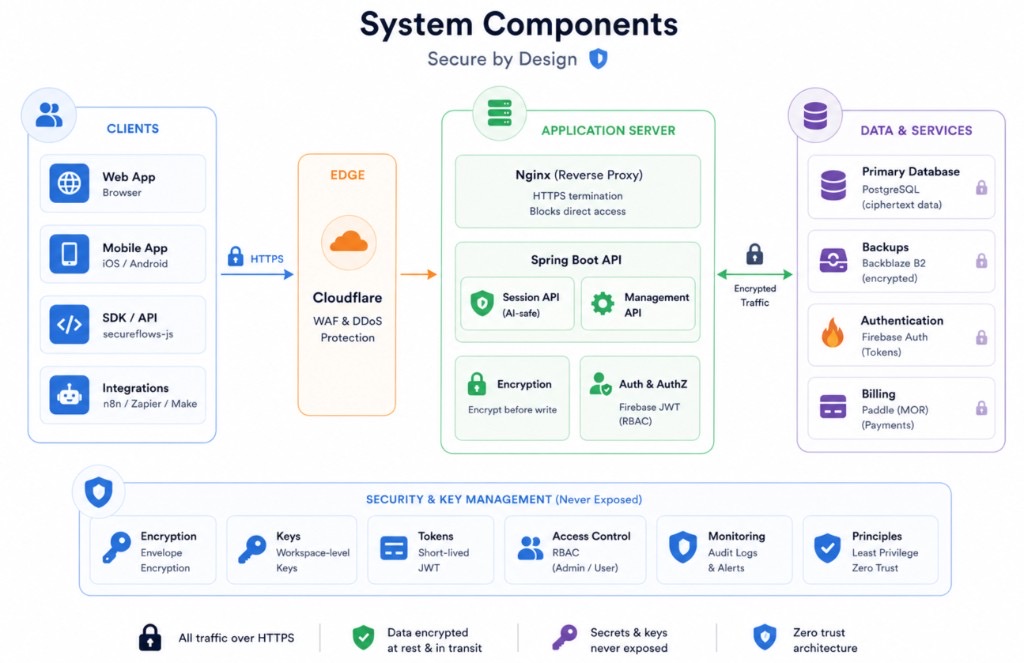
The four zones
Read the diagram left to right. Each column is a trust boundary — not a box you wire up yourself, but a layer the platform owns and enforces.
-
Clients
Web (React, Flutter Web), mobile (iOS/Android), the
secureflows-jsSDK, and automation tools (n8n, Zapier, Make). All use HTTPS to the Session API. Tokens stay in memory; browser logout uses a top-level redirect, notfetch. -
Edge
Cloudflare terminates TLS, applies WAF and DDoS protection, rate limits, and blocks direct Render bypass via host-header checks. No application logic runs here — only ingress hardening.
-
Application server
Nginx reverse-proxies to Spring Boot on Render. The Session API serves runtime traffic; the Management API serves workspace administration. Envelope encryption and Firebase JWT role checks happen in-process before any database read or write.
-
Data & services
PostgreSQL stores ciphertext sessions, billing state, users, applications, and audit metadata. Daily encrypted backups go to Backblaze B2. Firebase Auth issues and revokes tokens internally; Paddle handles billing webhooks. Integrators never call these services directly.
Session usage flow
The component diagram above shows what exists. This sequence shows how runtime works once your app is integrated: hosted login establishes identity, your client holds a short-lived token, and every data operation goes through the Session API — never directly to storage or Firebase.
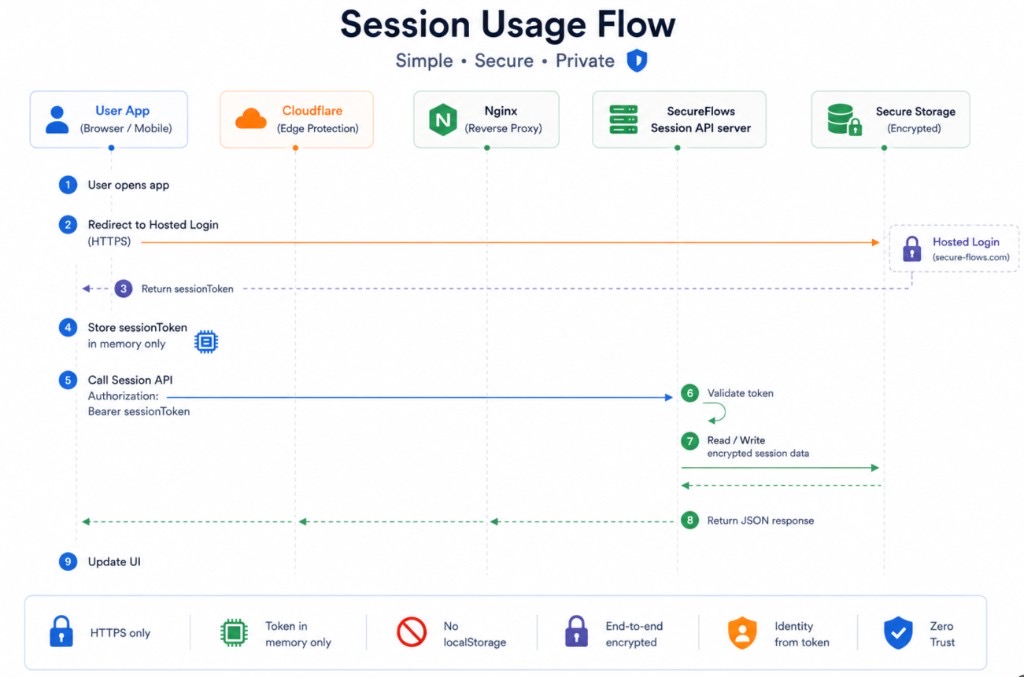
Follow the numbered steps. Orange arrows are browser redirects (login); blue arrows are HTTPS API calls; green arrows are encrypted reads and writes inside the platform boundary.
-
User opens the app No session yet — your application loads in the browser or on mobile. You do not show a login form or collect credentials; secureFlows owns authentication.
-
Redirect to hosted login Send the user to secureFlows hosted login over HTTPS (typically via your app's registered redirect URI). Cloudflare and Nginx sit in front; the user never talks to Firebase or your backend for sign-in.
-
Return
sessionTokenAfter successful authentication, hosted login redirects back to your app with a short-lived session JWT in the callback URL. Your app extracts it once — do not decode it client-side for identity or roles. -
Store token in memory only Keep the
sessionTokenin a JavaScript variable or in-memory app state — never inlocalStorage,sessionStorage, or cookies. This limits XSS blast radius: a stolen token expires; persisted tokens do not. -
Call the Session API Every read/write uses
Authorization: Bearer <sessionToken>over HTTPS. Use ai-safe endpoints such asGET /sessions/get/{key}andPOST /sessions/set/{key}. Do not senduserIdorworkspaceIdin the body — the server derives identity from the token. -
Validate token Spring Boot verifies the JWT signature, expiry, and
tokenRevision(instant revocation). Invalid or expired tokens return HTTP 410 Gone — the session data is still intact; redirect the user through hosted login again to obtain a fresh token. -
Read / write encrypted session data On a valid token, the API decrypts workspace payload in memory, applies the operation, re-encrypts, and persists ciphertext to PostgreSQL. Raw database or backup access never yields readable content for another tenant.
-
Return JSON response The API responds with JSON (session keys, values, or metadata as defined by the endpoint). The response travels back through Nginx and Cloudflare to your client — still over HTTPS only.
-
Update the UI Your app renders state from the response. Repeat steps 5–9 for each operation. For browser logout, use a top-level redirect to
GET /auth/logout— notfetch— so refresh tokens are revoked server-side.
What the flow enforces
Security & key management
The bottom band summarizes controls that are architectural — not optional configuration. They are never exposed to client code or third-party integrators.
tokenRevision; HTTP 410 means re-login, not data loss.