Every change to secureFlows runs through automated checks before it can reach your users.
That is how we protect reliability and security — not with hope, but with proof.
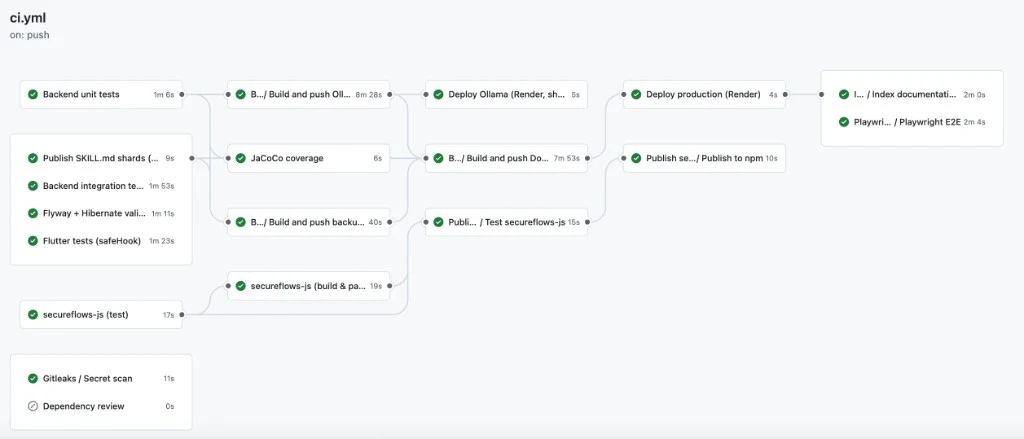
A real production release run — tests, secret scanning, image build, deploy, then live verification.
500+Backend unit tests on every change
500+Live API checks in integration suites
Always onSecret scanning on every pipeline
What we test — three levels
Quality is not one big “test suite.” We use three layers that catch different kinds of
problems, from a single function to a full browser session.
1. Unit tests
Fast, focused checks on individual pieces of logic — more than 500 on
the backend alone. They catch regressions early, on every pull request, before anything
is deployed.
2. Integration tests
Real HTTP conversations against a running API — 500+ live requests
across happy-path, security, billing, and isolation scenarios. They prove components
work together the way a real client would call them.
3. End-to-end (E2E) tests
A real browser walks critical user journeys after production deploy (Playwright) —
sign-in, workspace console flows, and more. This is the last safety net: the product as
a human actually uses it.
What the pipeline covers — product layers
secureFlows is more than one codebase. CI exercises each layer so a break in any of them
cannot slip through unnoticed.
Each layer has its own automated checks in the release pipeline.
Backend — unit + integration suites, plus database migration validation.
SDK — package tests and publish path for secureflows-js.
Search engine — doc search indexing on production releases; Support Bot depends on that same grounded documentation path.
Staging and production — two clear paths
We never treat “it worked on my machine” as enough. Changes move through a rehearsal
environment first, then a deliberate production release.
Staging
When code lands on the main branch, the full test suite runs and a staging build is
deployed automatically. That is our dress rehearsal — same product shape, safe to break
without touching customers.
Production
Production only moves when we cut a version release. The same gates run again: tests,
secret scanning, container build, deploy, then live checks (including Playwright E2E
and documentation search refresh). No silent shortcuts.
Three workflows that protect the product
1. CI — Continuous Integration
The backbone of every pull request and every release. It runs unit and integration
suites, Flutter console tests, the JavaScript SDK tests, database migration validation,
and secret scanning (Gitleaks). On a production tag it also builds and deploys the live
service, publishes the browser SDK when needed, and verifies the release with Playwright
end-to-end tests.
Why it matters: bad changes fail in automation — before they can weaken
isolation, break login, or ship a regression to your workspace.
2. Restore drill
Backups only help if they can be restored. On a weekly schedule we pull a real backup,
restore it into a throwaway database, and confirm the restore succeeds — using a
read-only key that cannot overwrite production backups.
Why it matters: durability is part of security. Encrypted data at rest
is only useful if we can bring it back when something goes wrong.
3. sf-integration-eval
A daily monitor of the path most builders actually use: an AI coding agent reads our
published integration instructions and generates a real app. We then judge that app two
ways — an independent AI code expert reviewer, and Playwright
driving a real browser through the login and session flow.
Generate → review the code → prove the app works in a browser.
The reviewer is a fresh AI session — it never sees the generator’s private
reasoning — and scores the code against our published rules. Playwright then boots the
app and walks the golden path in Chromium. The workflow does not block deploys; it
watches whether our instructions still produce correct integrations over time.
Why it matters: most customers meet secureFlows through AI-assisted
builders. We continuously prove that path still works — in the source and in a
real browser.
What this means for you
secureFlows is not a black box that “probably” works. It is shipped through layers of
automated proof: unit, integration, and E2E tests across backend, console, SDK, and search —
plus staging rehearsal, careful production releases, backup restore drills, and daily
AI-integration monitoring. That is how we keep tenant isolation, hosted login, and encrypted
sessions trustworthy as the product evolves.