Attack Patterns · 1 of 5
Broken Object-Level Authorization: How Changing One Number in a URL Is Enough to Steal Data
This is one of the most common bugs in apps built fast, and one of the easiest to understand. This is the first post in a series on the most common attack patterns; we'll start with the simplest one, which is unfortunately also the most common.
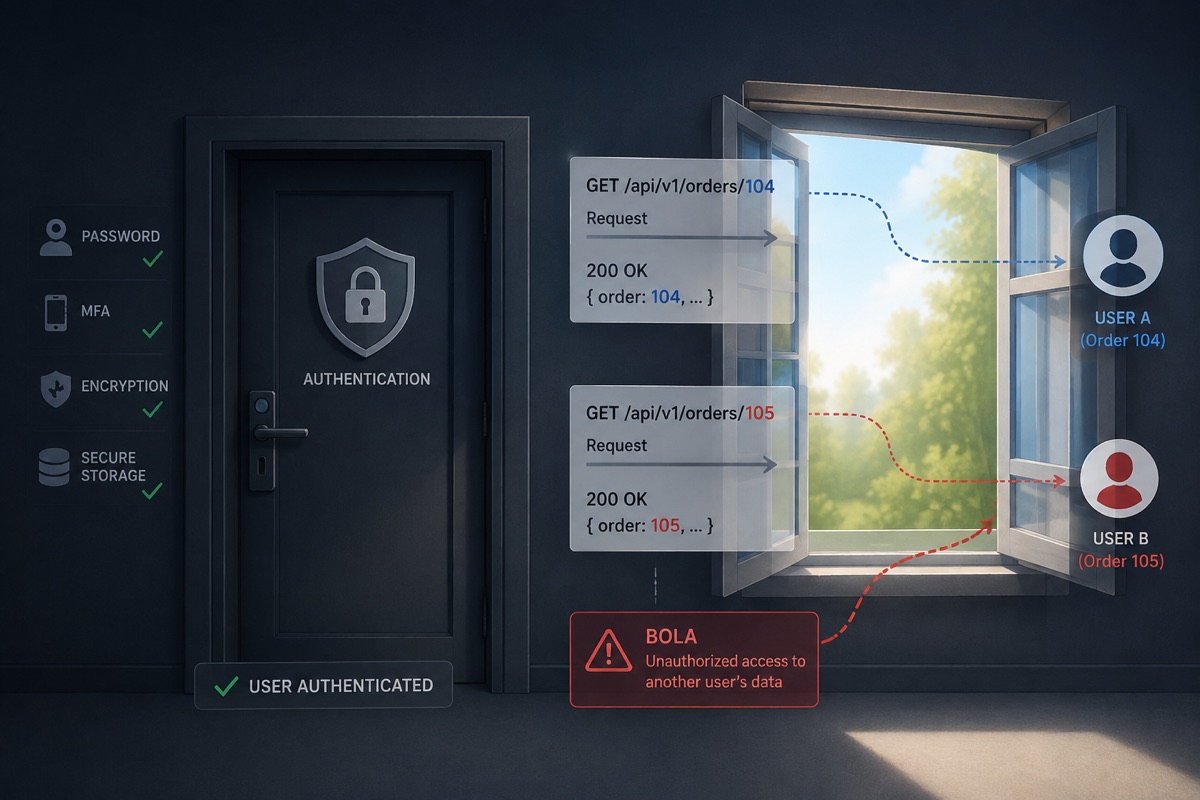
What Is "Broken Object-Level Authorization", Really?
Every piece of data in an app usually has an "ID": an order number, an invoice number, a profile number. A properly built app checks two things before showing data: (1) is the user logged in at all, and (2) does this specific item actually belong to this user. Broken object-level authorization, or BOLA for short (you'll sometimes hear the older name, IDOR), happens when the second check simply doesn't exist. The app checks "who you are," but forgets to check "is this yours."
Think of it like an apartment building with a keypad-locked front door. You have the code, so you can get into the building. That's "logging in." But once you're inside, every mailbox in the building is unlocked to anyone who knows its number. That's exactly the difference between who you are and what you're allowed to see.
How It Actually Happens
Say you have an invoicing app, and every invoice has a URL with a number:
myapp.com/invoice/1001. Dani logs in and sees his invoice at that address. Now
Dani, out of curiosity or because he's an attacker, just changes the number in the
address to myapp.com/invoice/1002 and hits Enter.
If the app only checked "is Dani logged in?" and never checked "does invoice 1002 belong to Dani?", the result is that Dani now sees Yael's full invoice, including the amount, her business details, and maybe payment info too. The scary part: this requires no special technical knowledge at all. It's the browser's address bar turned into a hacking tool.
An Example from the Press
Read the article on TechCrunch →
How to Fix It
The only fix that actually works is server-side ownership checks, on every request that returns or modifies a specific item: "does this item actually belong to the logged-in user?" It's not enough to check that the user is logged in. It's not enough to check that the ID is valid. You need to explicitly check that ownership matches on every endpoint that returns or changes data.
Note: making IDs harder to guess (say, a long UUID instead of 1001, 1002) helps a little, but it's not a real fix: that's obscurity, not authorization. A determined attacker, or an automated scanner, can still find a valid ID. And sometimes it doesn't even take any technical sophistication at all: Yael stepped away to the office kitchen for a moment and forgot to lock her screen, and Dani simply copied the secret ID that was sitting right there in front of him. And once someone already has one ID (from a shared link, a support ticket, an unlocked screen, another bug), a complicated ID won't stop them. The check itself is the only real solution, and you need it on every endpoint that returns or changes data. Forgetting it in just one place is enough to expose the whole system.
How to Check If Your App Is Exposed to This Pattern
This check takes five minutes and requires no technical knowledge:
- Open two different user accounts in your app (or ask a friend to open a second one).
- From the first account, find any private item (an order, a document, a profile) and copy its URL.
- Log out, and log in with the second account.
- Paste that exact same URL into your browser's address bar and hit Enter.
If the first account's data shows up on screen, you've found this pattern in your app. Better that you find it than someone else does.
How secureFlows Solves This From the Start
In secureFlows, access to data is determined by who's asking, not by an ID your app sends. When a user logs in, secureFlows issues a short-lived session token that securely identifies them, and every request carries that token. The server returns only what the token holder is allowed to see, no matter what number appears in the request. In other words: there's no such thing as "changing a number in the address" and getting someone else's data, because access to the data was never dependent on that number in the first place.
Think of it like a hotel key card: the key card you're given only opens your room, because the identification is encoded in the card itself. That's exactly how the token works: ownership isn't re-checked every time by someone remembering to add a line of code. It's simply built into the card that every request carries with it.

Want that check built into the infrastructure, instead of depending on a developer's memory at 2am? The "Start Building for Free" button below signs you up for secureFlows.
Start Building for Free